

 What Application Indicators are available?
This question exists because it has historical significance, but it is not considered a good, on-topic question for this site, so please do not use it as evidence that you can ask similar questions here. While you are encouraged to help maintain its answers, please understand that "big list" questions are not generally allowed on Ask Ubuntu and will be closed per the help center [1].
I installed Ubuntu 11.04 on one of my systems and I am using the Unity interface. Unity is working quite well so far but I really miss panel applets for net speed, cpu temp, and system monitor.
These applets are useful for viewing quick info. Unlike 10.10, there is no other way to get this info onto the panel or unity launcher. There are solutions like screenlets and conky but they don't feel appropriate for a clean desktop look.
If you know one then please list out any third party indicators with links so that they can be found.
Category: System Information
Network, memory and cpu usage indicator; this is a port of the original System Monitor GNOME Panel applet (gnome-system-monitor applet).

In Preferences you can customize the output to fit it to your desktop theme:

You can install it through the Ubuntu Software Centre by clicking this button:
or through the command line:
sudo apt-get install indicator-multiload
If you want the latest updates, you can install it from the PPA with these commands:
sudo add-apt-repository ppa:indicator-multiload/stable-daily
sudo apt-get update
sudo apt-get install indicator-multiload
 ACCEPTED]
Category: Other
StackApplet is a GNOME panel applet that monitors your activity on any StackExchange site.
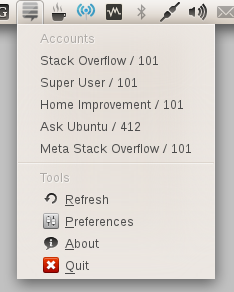
stackapplet
[2]
 [3] in Ubuntu Software Center
Get the latest version as follows:
sudo add-apt-repository ppa:stackapplet-dev/stackapplet
sudo apt-get update
sudo apt-get install stackapplet
The first time the application is used, run
python /usr/share/stackapplet/stackapplet.py &
from a terminal.
[1] http://stackoverflow.quickmediasolutions.com/stackapplet/Category: Application starter
Provides a simple way to get a classic GNOME-style application menu for those who prefer this over the Unity dash menu. Like the classic GNOME menu, it includes Wine games and applications if you have those installed.
To install Classic Menu indicator in Ubuntu Trusty Tahr:
sudo add-apt-repository ppa:diesch/testing
sudo apt-get update
sudo apt-get install classicmenu-indicator

Get the most recent version from its web page [2] (PPA available for Ubuntu 11.04, 11.10 and 12.04).
[1] http://www.florian-diesch.de/software/classicmenu-indicator/sudo apt-get update after adding the ppa - jfs
Category: System Information
Application Indicator showing hardware sensors.

First add the repository:
sudo apt-add-repository ppa:alexmurray/indicator-sensors
Update:
sudo apt-get update
And then install the package:
sudo apt-get install indicator-sensors
Then launch Hardware Sensors Indicator from Unity or run indicator-sensors from a terminal.
sudo apt-get update after the first step? Incidentally, I'm having trouble installing this one. Does one first have to install lm-sensors? - user25656
Category: Weather Forecasting
Warning. This indicator is not being updated anymore and will probably not work in current versions of Ubuntu.
UPDATE ! Development continues! https://launchpad.net/weather-indicator/+announcement/11516
Displays the current/extended weather, multiple locations and notifications support.

indicator-weather
[2]
 [3] in Ubuntu Software Centre
or project's PPA: ppa:weather-indicator-team/ppa
Please note! The latest builds of Weather Indicator require updated versions of pywapi, Python Weather API: ppa:pywapi-devel/ppa
There isn’t a software package called “indicator-weather” in your current software sources - Nicolas Raoul
Category: System Information

If you have a laptop or Netbook and want to be able to cool down that chip that's burning your hand and save some battery power this will be useful.
sudo apt-get install indicator-cpufreq
OR
If you don't use the indicator plugin (say, on Xfce), you can also use this utility in the systray (or notification area).
[1] https://launchpad.net/indicator-cpufreqCategory: Weather Forecasting
this is an indicator that will show weather information in your area, as well as other valuable information such as time of sunrise, sunset and moon phase
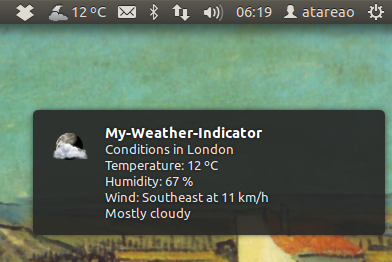
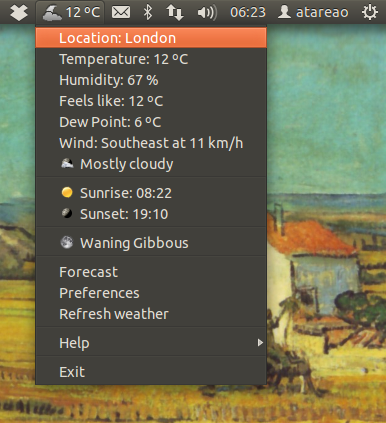
Find out whether you need to wear a jacket, a t-shirt or a waterproof suit... If you click on the indicator, you will get more information about, humidity, dew point, feels like, wind velocity and wind direction, weather condition.
My-Weather-Indicator informs you about sunrise ans sunset time, and the lunar phase
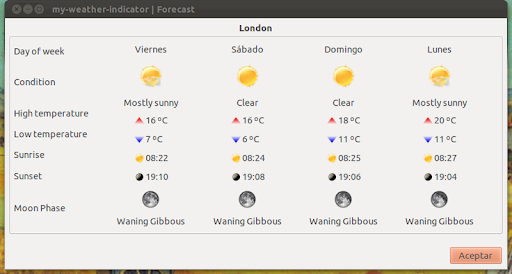
You can get the forecast for your area for next three days:
You can get information of the weather of two cities at the same time:
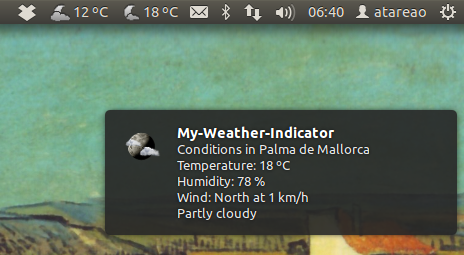
sudo add-apt-repository ppa:atareao/atareao
sudo apt-get update
sudo apt-get install my-weather-indicator
Category: File management
This is a simple indicator that shows common folders and all bookmarks, the indicator updates automatically if bookmark was added or removed.

Category: Power Management
Caffeine indicator allows user to temporary disable screensaver/sleep mode, Also there is option to add program in list to disable screensaver permanently for that program.
To install Caffeine indicator in Ubuntu:
sudo add-apt-repository ppa:caffeine-developers/caffeine-dev
sudo apt-get update
sudo apt-get install caffeine

Category: Cloud Computing

Download and install the deb [2].
[1] https://www.dropbox.com/downloading?os=lnxCategory: Computer Health
Redshift adjusts the color temperature of your screen according to your surroundings. This may help your eyes hurt less if you are working in front of the screen at night.

gtk-redshift
[2]
[3] in Ubuntu Software Centre
Customise Colour Temperature
You can change the colour temperature by adding -t DAY:NIGHT to the Redshift commmand in Startup Applications, here is a popular example:
gtk-redshift -t 6500:5500
Category: Virtualization
A Python3 indicator to launch virtual machines.
Support for Debian, Fedora, Manjaro, openSUSE Tumbleweed and Ubuntu derivatives.
Source and installation instructions located on GitHub [2].

Category: Computer health

f.lux makes your computer screen look like the room you're in, all the time. When the sun sets, it makes your computer look like your indoor lights. In the morning, it makes things look like sunlight again.
sudo add-apt-repository ppa:kilian/f.lux
sudo apt-get update
sudo apt-get install fluxgui
Edit
This repository is no longer accesible:
"This page does not exist, or you may not have permission to see it."
https://launchpad.net/~kilian/+archive/ubuntu/f.lux
[1] http://stereopsis.com/flux/linux.htmlCategory: Taking and editing screenshots
Shutter [2] is a program for capturing and editing screenshots
Shutter is a feature-rich screenshot program. You can take a screenshot of a specific area, window, your whole screen, or even of a website – apply different effects to it, draw on it to highlight points, and then upload to an image hosting site, all within one window.
~ shutter-project.org [3]
To install it, use the
Software Center
 [4].
[4].
Alternatively you can run these commands in a
Terminal
[5]:
sudo add-apt-repository ppa:shutter/ppa
sudo apt-get update && sudo apt-get install shutter

Category: Concentration / Get things done
This is a simple indicator that helps keep concentrated. You start it before a complicated problem and you have to keep concentrated for at least 10 minutes after it becomes green you can continue to work on your problem but you get thing done.
You can find more information about this concentration technique on the official website [2].
Often when you start to work, you continue and tomate give you feedback of the time it took to fix the task.

EDIT: If direct download does not work the first time, wait a little and try again. Instead you can also run:
git clone https://git.gitorious.org/~natim/tomate/natim-tomate.git
EDIT 2: You can also install Tomate via the PPA [4].
sudo add-apt-repository ppa:stvs/tomate
sudo apt-get update && sudo apt-get install -y tomate
Category: Mounting/Drive Removal
Handy applet if you are swapping out usb sticks, cards and hardrives on a regular basis.

You can install
ejecter
[2]
[3] without using the PPA - it's in the default repositories.
libgdu is no longer available so now needs to use libudisks2. For now see USB Safe Removal - Cas
Bdin, which can mount/unmount and eject removable devices. It can be found here: github.com/fenrrir/bdin. It's a Python script, place it into /usr/local/bin/ and make executable. Add the launcher to the "Startup applications" in order to start it automatically: run gnome-session-properties and enter /usr/local/bin/bdin.py in the command field. - whtyger
Category: System Information
Nice and simple just shows as text the current processor and ram usage, and also various temperature sensors detected in your system.

ppa:alexeftimie/ppa and install package indicator-sysmonitor
It is possible to add own scripts [2] for customized output:

Category: Other
Chars indicator is a replacement for the old character applet. It allows you to store characters, which are potentially not available on your keyboard directly, in order to use them conveniently without searching the full chaaracter map (such as fancy unicode chars).
A click on a symbol in the menus copies the selected character to the "middle mouse button" clipboard so it can easily be inserted.
Configuration is really easy: Create a file .indicator-chars in your home dir. Every line in this file represents a set of char (menu items in the main menu) and the single characters are selectable from the corresponding sub-menu.

Source code [2]
[1] https://github.com/tobyS/indicator-charsCategory: Power management
A really helpful power management indicator. You can use it to change display settings as well as simple power management schemes, or to disable your touchpad or wifi adapter on laptops.
It can either run with the new applet system, or with the old notification area system.
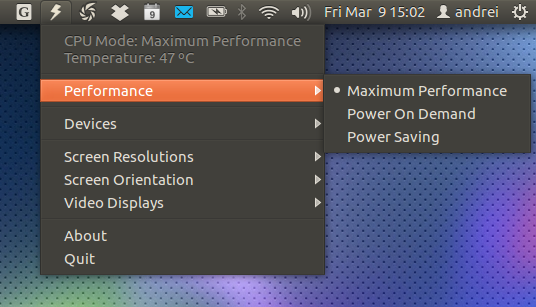
This little icon has helped me a lot in keeping my laptop's temperature under control.
Category: Network
A simple version of SSHMenu with a list of your regular SSH connections (previously called SSHlist). SSHplus supports sshmenu configuration files, and adds the entries automatically.

Download sshplus.py from here [1]
In Terminal make the file executable and copy to /usr/local/bin
chmod a+rx sshplus.py
sudo cp sshplus.py /usr/local/bin
Create a .sshplus file in home directory and add ssh hosts - one per line
gedit ~/.sshplus
Configuration example provided here [2].
Run Command Alt+F2 and type sshplus.py
Source [3]
[1] https://bitbucket.org/anilg/misc/srcsudo apt-get install remmina - Bernmeister
Category: Multimedia
A minimalistic radio player that runs in the notification area. One can also add many other radio stations by adding their URLs.

This package exists in the repositories. Radiotray, can be installed with this command:
sudo apt-get install radiotray
Category: Screen brightness control
Brightness indicator allows you to control your laptop display brightness with indicator.
Features:
To install Brightness indicator in Ubuntu:
sudo add-apt-repository ppa:indicator-brightness/ppa
sudo apt-get update
sudo apt-get install indicator-brightness

Category: System Information
SysPeek is a system monitor indicator that displays CPU usage, memory usage, swap usage, disk usage and network traffic.

ppa:emptythevoid/syspeeknew and install package syspeek, with these commands:
sudo add-apt-repository ppa:emptythevoid/syspeeknew
sudo apt-get update
sudo apt-get install syspeek
Update: SysPeek doesn't work properly with recent Ubuntu versions (and it's not available for Ubuntu versions newer than Precise in the PPA above). Recently, Marco Trevisan ported the indicator to GTK3 and added various fixes - more info WebUpd8 [2]. You can download the DEB from HERE [3].
[1] https://launchpad.net/~vicox/+archive/syspeekCategory: System Information
A port of the old netspeed GNOME applet. Shows the current transfer rate directly on the panel.
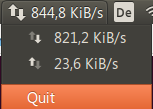
Quick build instructions:
sudo apt-get install build-essential libgtop2-dev libgtk-3-dev libappindicator3-dev git-core
git clone git://github.com/mgedmin/indicator-netspeed.git
cd indicator-netspeed
make
sudo make install
indicator-netspeed &
This indicator was packaged as a deb by WebUpd8 [3]. You can download it from HERE [4].
Now also available in Webupd8 PPA:
sudo add-apt-repository ppa:nilarimogard/webupd8
sudo apt-get update
sudo apt-get install indicator-netspeed
Category: Clipboard Manager
One of many clipboard managers this is considered to be the pick of the bunch but we will leave opinions to the bloggers as that's their job.

ppa:hel-sheep/pastie and install package pastie, with these commands:
sudo add-apt-repository ppa:hel-sheep/pastie
sudo apt-get update
sudo apt-get install pastie
parcellite works wonders on precise but there's no indicator. still works just fine with the global shortcut keys. default is ctrl+alt+h and ctrl+alt+p for preferences. - gcb
diodon is wonderful and automatically starts at login. It also has a nice icon that blends well. It's there in hte repos - notablytipsy
Category: System Information
This one shows which key locks you have enabled caps, num, scroll etc.

ppa:tsbarnes/indicator-keylock and install package indicator-keylock
Category: Mounting/Drive Removal
A little appindicator for flash drive safe removal.

To add this indicator, download & install the deb [2]
[1] https://github.com/cas--/indicator-usb~/.config/indicator-usb. I have enabled issue tracker. - Cas
Category: Clipboard Manager
A clipboard manager for the Gnome desktop, it can store text from both keyboard and mouse so you can easily access the clipboard using a hotkey.

glipper
[2]
[3] in Ubuntu Software Centre
diodon is a fine alternative - notablytipsy
Category: Clipboard Manager
Diodon is a lightweight clipboard manager for Linux written in Vala which "aims to be the best integrated clipboard manager for the Gnome/GTK+ desktop".
To install Diodon indicator in Ubuntu:
sudo add-apt-repository ppa:diodon-team/stable
sudo apt-get update
sudo apt-get install diodon

Category: Monitor Switching
Disper-indicator provides a simple user interface for Disper. Disper-indicator detects which monitors are currently connected to the computer and provides options to enable single screens, clone or extended screen configurations.

ppa:nmellegard/disper-indicator-ppa and install package disper-indicator
This indicator requires Disper [2] to be installed
[1] https://code.launchpad.net/~nmellegard/disper/disper-indicatorE: Unable to locate package disper-indicator - Sadegh
Category: Other, System
Wiki article [2]
The Recent Notifications applet displays the recent NotifyOSD notifications and allows you copy the text or a link from a notification. You can also click on a link to open it. There are options to blacklist applications within the applet to hide the associated notifications and set the time limit to show a message.
To install Recent Notifications indicator in Ubuntu:
sudo add-apt-repository ppa:jconti/recent-notifications
sudo apt-get update
sudo apt-get install indicator-notifications recent-notifications

After installing run Alt+F2 unity --replace. You will find a little mailbox in the panel.
(more info about changing the icon and uninstalling) [3]
[1] https://launchpad.net/~jconti/+archive/recent-notificationsCategory: System
If you have a touchpad on your laptop that you want to toggle on and off then you will need this.

ppa:atareao/atareao and install package touchpad-indicator
Category: Amusement
A Python3 indicator which shows the current Star Trek™ stardate.
Support for Debian, Fedora, Manjaro, openSUSE Tumbleweed and Ubuntu derivatives.
Source and installation instructions located on GitHub [2].

Category: Screen Capture
Lookit is a screen capture tool that can be used to capture an area or the entire screen. After capturing, you can save it on your desktop or upload to a FTP, SSH server or Imgur.

ppa:lookit/ppa and install package lookit
Category: Workspace
A little indicator to make it easy to switch workspaces.

ppa:geod/ppa-geod and install package indicator-workspaces
Note: Does not currently have a 11.10 repository. See this answer [2] on how to install in 11.10.
[1] https://launchpad.net/indicator-workspacesCategory: System Information
indicator-sysload is an Ubuntu appindicator that displays the system load (CPU, memory usage, network traffic)

Source Code [2]
[1] https://gist.github.com/982939Category: Other, System
Indicator-updatemanager is small update indicator in system-tray that informs about available updates. It will disable the annoying popup ‘Update Manger’ window.

The Webupd8 PPA has built this for Ubuntu Precise 12.04 and Oneiric 11.10. So as an alternaive, Ubuntu 12.04 and 11.10 can add the PPA and install it by executing following commands in terminal:
sudo add-apt-repository ppa:nilarimogard/webupd8
sudo apt-get update
sudo apt-get install indicator-updatemanager
Run application by:
[1] https://askubuntu.com/a/114996/22263
update_indicator
Category: Clipboard Manager
A Parcellite fork that uses an Ubuntu appindicator and also comes with some other fixes and improvements.
ppa:shantzu/clipit and install package clipit
Category: Utilities, Other
An indicator to add Sticky Notes capability to Unity desktop. Can add multiple notes, hide them all or show them at the same time.

To install:
sudo add-apt-repository ppa:umang/indicator-stickynotes
sudo apt-get update
sudo apt-get install indicator-stickynotes
Category: System Information
An applet capable of displaying detailed information about the battery.
ppa:iaz/battery-status and install package battery-status
To run Battery Status as an indicator applet in Ubuntu: (More Info) [2]
/usr/lib/battery-status/battery-status --indicator
Category: Other, Window Management
Window-list displays a list of current open desktop windows. Windows can be activated by selecting them from the menu list.


Windows-List is available for all versions of Ubuntu running Unity.
install via ppa:
sudo add-apt-repository ppa:jwigley/window-list
sudo apt-get update
sudo apt-get install window-list
deb package is also available from the launchpad repository [2].
run application by:
window-list

sudo add-apt-repository "deb http://archive.canonical.com/ $(lsb_release -sc) partner"
sudo apt-get update
sudo apt-get install skype
Prime Indicator is a small, helpful Ubuntu AppIndicator for Nvidia Optimus users running Ubuntu 14.04 which allows users to quickly switch between Intel and Nvidia graphics cards.

 sudo add-apt-repository ppa:nilarimogard/webupd8
 sudo apt-get update
 sudo apt-get install prime-indicator
Category: RSS Feeds
UPDATE: Google Reader is now discontinued.
Google Reader Indicator displays the number of unread items in your Reader account along with article title and excerpt. Click on an article will open it in your default browser.
ppa:atareao/atareao and install package google-reader-indicator
Category: Networking

This applet provides indicator support to Haguichi, a popular Hamachi GUI for Gnome.
ppa:webupd8team/haguichi and install package haguichi-appindicator
Category: Clipboard Manager
A simple clipboard manager for Ubuntu that provides clipboard support for history, images, text and more.

ppa:bikooo/glippy and install packages glippy & glippy-ubuntu-mono
Sound Switcher Indicator allows for easy switching of the default sound input ("source" in PulseAudio terms) and output ("sink") with just a couple of clicks:

In order to install it:
sudo add-apt-repository ppa:yktooo/ppa
sudo apt-get update
sudo apt-get install indicator-sound-switcher
After that simply find and run Sound Switcher Indicator.
Category: network, finance
indicator-stocks is a simple stock quotes indicator.
You can click on a menu item to see the stock chart in a browser.

sudo add-apt-repository ppa:ce3a/indicator-stocks
sudo apt-get update
sudo apt-get install indicator-stocks
source code [2]
[1] https://launchpad.net/~ce3a/+archive/indicator-stocksPsensor is a tool to monitor hardware temperature that integrates nicely with Unity by using an Unity Launcher counter which displays the enabled temperatures as well as an appindicator that you can use to take a quick look at all available hardware temperatures or cpu usage.
Psensor can monitor:

Plug-ins installation:
sudo apt-get install lm-sensors hddtemp

sudo sensors-detect

sudo service module-init-tools start
Psensor installation:
sudo add-apt-repository ppa:jfi/ppa

sudo apt-get update

sudo apt-get install psensor
Category: Mounting/Drive Removal
Mounty is a very simple indicator applet you can use to mount CD / DVD images. It supports ISO, IMG, BIN, MDF and NRG and besides mounting, it can also burn the images to a CD/DVD.
ppa:tldm217/tahutek.net and install package mounty
Follow the directions on this page: https://launchpad.net/mounty
You can get the .deb package by running
sudo add-apt-repository "deb http://download.learnfree.eu/repository/skss / #SKSS"
wget http://download.learnfree.eu/repository/skss/repo.pub.asc -q -O- | sudo apt-key add -
sudo apt-get update ; sudo apt-get install mounty
This is the official Mounty repository
The original PPA no longer works for some reason but this did the trick.
[1] http://skss.learnfree.eu/Category: Wallpaper Control

This applet works in tandem with the wallpaper changer DesktopNova [2].
ppa:michael-astrapi/ppa and install packages desktopnova & indicator-desktopnova
Category: Window Manager Switching

Displex provides similar functionality to "fusion-icon" but provides a lot more features. It can control window decorations, screen rotation through Xrandr, switch between Metacity or Compiz compositing, provide AcerHK support and more.
To add this indicator, download & install the deb [2]
[1] http://sourceforge.net/p/displex/home/Category: RSS Feeds
Panel-based RSS reader. Feed indicator can show RSS feed updates in the Panel via its indicator.
To add this indicator, download & install the deb [2]
Or using a PPA:
sudo add-apt-repository ppa:noobslab/indicators
sudo apt-get update
sudo apt-get install feedindicator

SimpleStarter is an application starter, based on sshlist. You can launch all programs like putty or rdesktop, not only gnome-terminal, and choose a title for each menu entry.
Download: http://static.bheil.net/geraffel/simplestarter.py
Description at blog post: http://www.bheil.net/blog/2011/07/07/simplestarter-simple-application-starter-appindicator
CrystalHD indicator
The indicator shows several states of the crystalhd (Broadcom BCM70012 BCM70015) linux driver: Disabled, enabled, working and error. It also lets you disable and enable the driver.


Privacy Indicator can be used to enable or disable:
The indicator also supports clearing the Zeitgeist log and recent files (from the new Nautilus 3.6 sidebar, etc.).
To install it in Ubuntu 12.10 or 13.04:
sudo add-apt-repository ppa:diesch/testing
sudo apt-get update
sudo apt-get install indicator-privacy
More info: Unity Privacy Indicator: Quickly Enable Or Disable Dash Online Search Results Or Zeitgeist Logging [1]
[1] http://www.webupd8.org/2013/02/unity-privacy-indicator-quickly-enable.htmlCategory: Information
A Python3 indicator which displays lunar, solar, planetary, comet, minor planet, star and satellite information.
Support for Debian, Fedora, Manjaro, openSUSE Tumbleweed and Ubuntu derivatives.
Source and installation instructions located on GitHub [2].

Category: System Information
Shows the incoming and outgoing network traffic.
Significantly modified Netspeed Indicator [2].

Features:
Installation in the terminal:
sudo apt-add-repository ppa:fixnix/netspeed
sudo apt-get update
sudo apt-get install indicator-netspeed-unity
After installation, you can run indicator. The launcher is located in the main menu under «Internet» under the name «Indicator netspeed-unity». Indicator when the installation is prescribed in startup, so after the restart run itself.
[1] https://github.com/GGleb/indicator-netspeed-unityCategory: Download
Provides an App-Indicator for you Synology NAS. Add links and torrents, see download progress, auto-add torrents from a folder. Only useful if your platform supports App-Indicators and you own a Synology NAS!
» download from sourceforge [2]
[1] https://sourceforge.net/projects/synoindicator/
An appindicator for toggling the Unity launcher mode (fixed or autohide).
[1] http://napdivad.com/unity_launcher_toggle/Category: Reporting
A Python3 indicator which shows the download counts for PPAs.
Support for Debian, Fedora, Manjaro, openSUSE Tumbleweed and Ubuntu derivatives.
Source and installation instructions located on GitHub [2].

HackerTray [1]
Category: Other/Hakernews
HackerTray is a simple Hacker News Linux application that lets you view top HN stories in your System Tray.

Installation steps [2] :
sudo pip install hackertray
OR
sudo easy_install hackertray
OR
#Download Source and cd to it
sudo python setup.py install
After that, you can run hackertray from anywhere and it will run.
Alternative:
sudo apt-get install python-appindicator python-pip
sudo pip install hackertray
After installation open terminal and run indicator with this command "hackertray &" without quotes.
To make HackerTray indicator run by default hit Super key and type Startup Applications and launch it, in opened window click add and enter name and command:
Name: Hackertray indicator
Command: /usr/local/bin/hackertray

And press save, now log out and log in back. Done.
Indicator Synapse, a search indicator made by Tom Beckmann for elementary OS. The indicator is similar to Mac OS Spotlight. It creates virtual index of files and items which are on the system. It is designed to access files and items quickly. It also has ability to search in online dictionary/knowledge engine (WolframAlpha) and web.
To install Synapse indicator in Ubuntu:
sudo add-apt-repository ppa:noobslab/indicators
sudo apt-get update
sudo apt-get install indicator-synapse

Here [1] are some of the indicators I wrote. They are single files based on python for guake [2] and gpaste [3].
There is also a calendar indicator for Nepali [4] i.e. my native country.
[1] https://github.com/sagarchalise/My-Ubuntu-Unity-Indicatorsfor Ubuntu 14.04 - 16.04
Category: System

Indicator, when clicked, shows the tray.

Also there is a display mode "separately from the indicator" - on top of the panel like a dock. In this mode, the position can be changed by scrolling the mouse over the indicator. To change the mode position: press the middle mouse button on the indicator.
Installation in the terminal:
sudo apt-add-repository ppa:fixnix/indicator-systemtray-unity
sudo apt-get update
sudo apt-get install indicator-systemtray-unity
You must then log out and again log in using your user.
To remove this package (with its configuration files!!!):
sudo apt-get --purge remove indicator-systemtray-unity
With Crypt-Folder you can manage EncFS folders via this indicator, You can mount, unmount EncFS folders, create new EncFS folders, stores the password in Gnome Key-ring and mounts it at login, change existing EncFS folders password.
To install Cryptfolder indicator in Ubuntu:
sudo add-apt-repository ppa:atareao/atareao
sudo apt-get update
sudo apt-get install cryptfolder-indicator

Category: Network, Audio, Video, Images

Indicator to run and stop
minidlna
[2]
[3] DLNA server providing UPnP/DLNA access to audio, video, and image directories (e.g. for streaming to a DLNA compliant TV set).
Run minidlna with non-root privileges with an easy to edit configuration minidlna.conf stored in ~/.config/minidlna.
This Python application runs with both Python2, and Python3.
[1] https://launchpad.net/minidlna-aiQnotero [1]
Category: Academic
Qnotero is a quick access panel to your Zotero [2] library, an open source reference manager.
sudo add-apt-repository ppa:smathot/cogscinl
sudo apt-get update
sudo apt-get install qnotero
GIS Weather [1]

Features:
Supported weather services:
Gismeteo.com
AccuWeather.com
OpenWeatherMap.org
Yr.no
Support SVG and widget scale
To install GIS Weather in Ubuntu 15.10 Wily/15.04 Vivid/14.04 Trusty/12.04 Precise
sudo add-apt-repository ppa:noobslab/apps
sudo apt-get update
sudo apt-get install gis-weather
@ The Killer @ [1]
If you want video tutorial Jupiter Broadcasting [2]
Peer To Peer (P2P) Sync and Share Ubuntu [3]
Indicator


Category: Amusement
A Python3 indicator which calls the fortune program and shows the result in the on-screen notification.
Support for Debian, Fedora, Manjaro, openSUSE Tumbleweed and Ubuntu derivatives.
Source and installation instructions located on GitHub [2].

Category: Accessibility
Keyboard modifiers state indicator for Ubuntu Unity desktop. Unity lacks such accessibility tools which most likely needed when sticky keys is activated.
Icon Mode

Label Mode

Daily Build: To install add PPA
sudo add-apt-repository ppa:sneetsher/one
sudo apt-get update
sudo apt-get install indicator-xkbmod
Category: Information
A Python3 indicator which shows tidal information. The user must craft their own Python3 script to obtain the tidal data which is then passed back to the indicator for display.
Support for Debian, Fedora, Manjaro, openSUSE Tumbleweed and Ubuntu derivatives.
Source and installation instructions located on GitHub [2].

Category: Date & Time
Displays the terran computational calendar date.
This calendar system may be useful for mathematicians and programmers due to it's simple algorithm, zero-based numbering, and synchronization with the Unix Epoch. More info at terrancalendar.com
This app indicator can be downloaded from github [2] or from the links below.

install: terrancalendar.com/app_indicator/install.txt [3]
app indicator: terrancalendar.com/app_indicator/terran_computational_calendar.py [4]
[1] https://github.com/terrancalendar/terrancalendar/tree/master/ubuntu_app_indicatorReminder indicator is an indicator app specially designed for Ubuntu to set schedule reminders. These reminders can be configured to play a sound, show a notification, and/or run a command. Indicator Reminder has a powerful date/time selection feature that allows you to express recurring dates/times in plain English. For example: "every day", "every Monday", "every other", "every weekday", "every 30 minutes", and more!. They can also be set to repeat minutely or hourly.

To install Reminder indicator in Ubuntu Trusty Tahr(tested):
sudo add-apt-repository ppa:bhdouglass/indicator-remindor
sudo apt-get update
sudo apt-get install indicator-remindor
or install QT version of Reminder indicator via following commands in Ubuntu 14.04 Trusty:
sudo add-apt-repository ppa:bhdouglass/indicator-remindor
sudo apt-get update
sudo apt-get install remindor-qt
Tomboy is a desktop note-taking application which is simple and easy to use. It lets you organise your notes intelligently by allowing you to easily link ideas together with Wiki style interconnects.
To install Tomboy Notes Indicator in Ubuntu:
sudo apt-get install tomboy

Calendar indicator is linked with Google Calendar, You can access your Google account calendar via this indicator and get notifications directly on your desktop.
To install Calendar indicator in Ubuntu:
sudo add-apt-repository ppa:atareao/atareao
sudo apt-get update
sudo apt-get install calendar-indicator

Category: Utility
A Python3 indicator to convert a URL between Unicode and ASCII.
Support for Debian, Fedora, Manjaro, openSUSE Tumbleweed and Ubuntu derivatives.
Source and installation instructions located on GitHub [2].

Live Cricket Score Indicator:(available for Ubuntu 14.04, 15.04 and 15.10)
Category: Other
Cricket Score Indicator [1] is an App-indicator displays live cricket scores:
Open Terminal and run the commands(Ctrl+Alt+T)
sudo add-apt-repository ppa:rawcoder/cricket-score-indicator
sudo apt-get update
sudo apt-get install cricket-score-indicator
Category: Information
A Python3 indicator which displays calendar events in the menu.
Support for Debian, Fedora, Manjaro, openSUSE Tumbleweed and Ubuntu derivatives.
Source and installation instructions located on GitHub [2].

The only way I know of displaying to the Systray / Application Indicator using bash is with
Indicator-Sysmonitor
[1]. I used it to create an animated text-spinner count down timer:

Notice the top left of the Systray / Application Notification Area. When bash script starts a spinning text pizza appears beside:
Lock screen in: 28 Minutes Brightness: 450
This part of the Systray is generated by a bash script. For more details see: Can BASH display in systray as application indicator? [2]
[1] http://www.webupd8.org/2014/05/ubuntu-appindicator-that-displays-bash.html